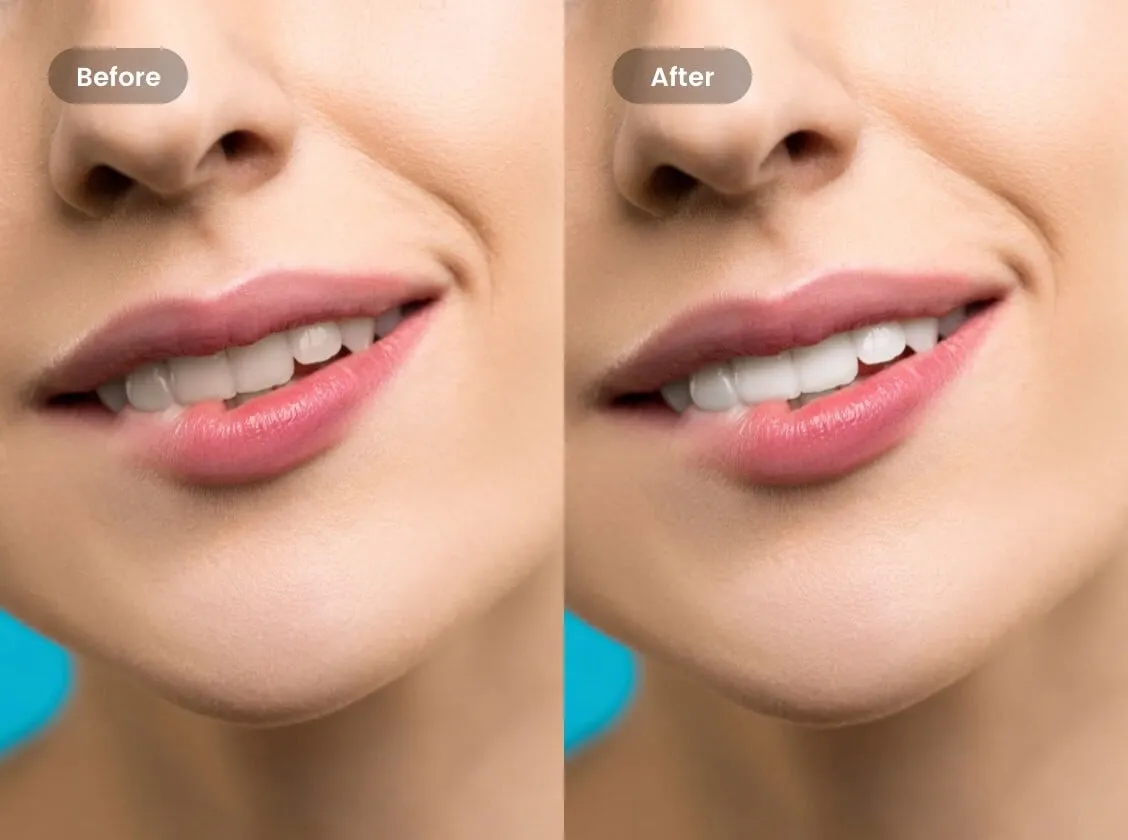
Understanding Teeth Whitening Apps
In today’s digitally driven world, the quest for the perfect smile has extended beyond the dentist’s chair and into the realm of smartphone apps. Teeth whitening apps have emerged as a popular tool, offering users a convenient way to enhance their smiles in photos. These apps leverage sophisticated algorithms and image editing techniques to simulate the effect of professional teeth whitening, providing a quick and easy solution for a brighter, more confident appearance. Whether it’s for a selfie, a professional headshot, or a casual snapshot with friends, these apps have become go-to tools for many. This article delves into the top 5 app choices available, exploring their features, benefits, and how to achieve the most natural-looking results.
How Teeth Whitening Apps Work
Teeth whitening apps work primarily by analyzing the color data of the teeth in a photo and then applying modifications to lighten them. This typically involves adjusting the color saturation, brightness, and sometimes the hue of the teeth within the image. Advanced apps often use AI-powered tools to identify the teeth accurately, allowing for precise editing and preventing unintended alteration of the surrounding features. The core function involves the application of digital filters or brushes that target the tooth area specifically. These tools enable users to selectively lighten the teeth, remove stains, and create a more aesthetically pleasing smile. The effectiveness depends heavily on the app’s algorithm and the quality of the image, but the best apps can produce remarkably realistic results.
Benefits of Using Teeth Whitening Apps

The benefits of using teeth whitening apps are numerous. The most immediate advantage is the ability to instantly improve your smile in photos, boosting confidence and enhancing the overall aesthetic appeal. These apps offer a quick and cost-effective solution compared to professional teeth whitening treatments. Moreover, they provide flexibility and control over the final look, allowing users to adjust the whitening intensity to achieve their desired results. Beyond personal use, these apps are invaluable for social media, dating profiles, and professional online portfolios, where a bright, clean smile can make a significant positive impact. They are user-friendly, with intuitive interfaces and easy-to-use tools, making photo editing accessible to everyone, regardless of their technical skills.
Top 5 Apps to Whiten Teeth in Photos
Here are the top 5 apps offering teeth whitening features, each with unique strengths and capabilities. Consider this comparison chart before making your choice, and explore their features to find the ideal one for your needs.
App 1 Overview and Features
App 1 is a leading choice for photo editing, including exceptional teeth whitening capabilities. It provides a comprehensive suite of tools designed for both beginners and experienced users. It stands out due to its user-friendly interface and sophisticated algorithms that deliver natural-looking results. Along with teeth whitening, this app offers a wide range of photo editing functions, such as skin smoothing, blemish removal, and adjustments to lighting and color. It’s praised for its consistency and reliability in producing high-quality photo enhancements, and it is often updated with new features and improvements.
User Interface and Ease of Use

The user interface is intuitive and straightforward, allowing users to quickly navigate and access different editing tools. The teeth whitening tool is easily accessible, often presented as a dedicated option within the app’s main menu. Its slider-based controls provide fine-grained adjustments to the whitening effect, empowering users to control the degree of enhancement precisely. This ease of use makes it suitable for users with varying levels of experience, from casual users to professional photographers. The layout is clean, minimizing clutter and maximizing the editing experience.
Whitening Tools and Techniques
The teeth whitening tool within App 1 utilizes advanced techniques to achieve a natural look. Users can select the teeth directly using auto-detection or manual selection. The tool intelligently analyzes the image data to distinguish the teeth from the surrounding areas. The tool includes a whitening slider allowing for the adjustment of the effect’s intensity. It also includes fine-tuning options, such as controlling the brightness and saturation, to perfectly match the enhancement with the image. There is often an option to apply the whitening to multiple teeth simultaneously, saving time and making it perfect for group photos.
App 2 Overview and Features
App 2 is recognized for its specialized focus on beauty and portrait enhancements, including high-quality teeth whitening capabilities. It features a unique blend of advanced technology and ease of use, making it an attractive option for those looking to enhance their photos. The app provides tools that go beyond basic teeth whitening, offering skin smoothing, reshaping, and other facial enhancements. Its algorithms provide exceptional performance in diverse conditions, contributing to the app’s overall appeal. App 2 is known for its quick processing and the ability to achieve dramatic improvements without sacrificing realism.
Pros and Cons of App 2

Pros include exceptional teeth whitening quality, a wide variety of additional beautifying tools, and a user-friendly interface. Cons are limited as it provides excellent functionality, but some advanced tools may require an in-app purchase. There are options for both free and premium versions, making it accessible for everyone to get beautiful photos.
User Reviews and Ratings
User reviews consistently highlight the app’s high performance and ease of use. It receives praise for its intuitive interface and quick processing times, making it a top choice for those seeking quick enhancements. Many users rave about the realistic results achieved with its teeth whitening tools, appreciating the balance between enhancement and natural look. The app generally earns high ratings on app stores, reflecting its popularity and satisfaction with its user base. Users often mention the value for money and the range of features offered within the premium version of the app.
App 3 Overview and Features
App 3 offers a wide range of photo editing tools, with a strong emphasis on versatility and customization. It is designed for users who require detailed control over their photo enhancements, offering extensive options for advanced editing. With its user-friendly design and its powerful editing suite, App 3 is ideal for users who are new to photo editing or need precise control over their modifications. Its teeth whitening tools are sophisticated, enabling users to fine-tune the details of the effect, giving an impressive appearance to the teeth.
Advanced Whitening Options

App 3 offers a variety of advanced whitening options, allowing users to tailor the effect to their specific needs. These features include options to adjust the brightness, contrast, and saturation of the teeth, creating a customized look. There are often tools to correct yellowing or staining, ensuring a natural-looking result. The app also allows users to select the specific areas of the teeth to whiten, providing precision control. These advanced options allow users to get perfect smiles, making this one of the best choices.
Integration with Other Photo Editing Tools
App 3 is known for its seamless integration with other photo editing tools, giving users even more editing flexibility. Integration may include tools to adjust the image’s overall color balance and improve the quality of the photo to ensure a more natural result. Its tools allow users to combine teeth whitening with other advanced editing features such as color correction, detail enhancement, and skin smoothing. This flexibility makes App 3 a complete photo editing tool for comprehensive image enhancement.
App 4 Overview and Features
App 4 distinguishes itself with its simple, user-friendly interface, making it ideal for quick, effortless edits. Its teeth whitening feature is easy to use, making it accessible to users of any skill level. Along with basic editing features, it provides special tools for beauty and portrait enhancement. App 4 is a fantastic choice for those looking for a simple, fast way to get better photos.
Price and Availability

App 4 is typically available on both iOS and Android platforms. The price and availability of App 4 vary, but it often offers a free version with basic features and a premium version with additional tools. Subscription models may be available, giving access to all the app’s features. The availability ensures a wide range of users can try and utilize the app’s teeth whitening features and other editing capabilities.
Customer Support and Tutorials
App 4 provides customer support resources to assist users. This may include tutorials, FAQs, and customer service to help users understand and efficiently utilize its features. The app often provides in-app tutorials and detailed guides, making it easier for users to learn how to use the app. Customer support aims to assist users in overcoming challenges and ensuring a seamless experience.
App 5 Overview and Features
App 5 is a leading app specializing in social media photo editing. It offers a variety of features, including teeth whitening, and is designed to make photos perfect for various social media platforms. Its teeth whitening tool is user-friendly, with a focus on simplicity and effectiveness. It is known for its filters and tools designed to enhance photos quickly and easily. The app provides easy access and user-friendly tools, making it a must-have for influencers and social media lovers.
Comparison of the Top 5 Apps

To help you select the perfect app, here is a detailed comparison of the top 5 apps, focusing on their key features. This comparison can help guide your choice based on your individual photo editing needs and preferences.
Whitening Effectiveness and Quality
The effectiveness of teeth whitening varies among apps. Factors include the quality of the algorithm, the range of editing options, and how well the tool integrates with other features. The best apps provide natural-looking results by fine-tuning the whiteness and contrast of teeth. High-quality apps offer tools to correct or remove stains, resulting in a more perfect smile. For example, App 1 is known for its natural look and precision, while App 2 often provides dramatic improvements. App 3 provides advanced tools, allowing for fine-tuning, while App 4 emphasizes simplicity. App 5 is tailored to social media photo editing.
Overall User Experience
User experience is essential when selecting a teeth whitening app. The best apps are known for their user-friendly interfaces. App 1 is known for ease of use and intuitive navigation, while App 2’s simplicity makes it a popular choice. Apps with easy access to the tools and simple controls are likely to make photo editing enjoyable and efficient. The best apps offer tutorials and support. Also, the ability to save or easily share edited photos enhances the overall user experience.
App Selection based on Needs

When picking the ideal teeth whitening app, consider your individual needs and preferences. If you value natural-looking enhancements and ease of use, App 1 is a perfect choice. For those who prioritize dramatic improvements and a wealth of beautifying tools, App 2 is an excellent choice. If you want advanced editing tools and precise control, consider App 3. App 4 is ideal for you if you require a simple and quick solution, whereas App 5 is excellent for social media-focused editing.
Tips for Achieving Natural-Looking Results
Achieving natural-looking results is key to using teeth whitening apps effectively. The best outcomes are when the edits seem natural and do not appear artificial. Implementing these practices when whitening teeth can help you get the best results.
Lighting and Photo Quality
The quality of lighting and photo quality plays an important role in the results. High-quality images with good lighting give better results. Photos taken in natural or soft light give better color accuracy, which helps the app to work efficiently. You should also be aware of shadows and highlights, making sure the whitening appears balanced. This helps achieve a more natural appearance.
Adjusting Whitening Intensity
The key to getting natural-looking results is to adjust the whitening intensity. You can start with slight adjustments to avoid over-whitening. The best apps provide sliders or other controls, allowing you to increase the whiteness gradually. Constantly review the results and adjust until the teeth look bright and natural. Moderation is crucial; you should avoid making the teeth too white.
Avoiding Over-Whitening
Avoiding over-whitening prevents the artificial appearance. Over-whitening can create a stark, unnatural look. Use the app’s tools to fine-tune the color. Also, consider the natural shade of your teeth. You can compare the result with your other facial features and the overall photo to ensure that your smile appears natural and attractive.
In conclusion, teeth whitening apps have become an easy and convenient way to get brighter smiles in photos. When choosing the right app, consider the features, user reviews, and your preferences. Remember to follow the tips on natural-looking results, and these tools will help you achieve a confident smile for any photo.