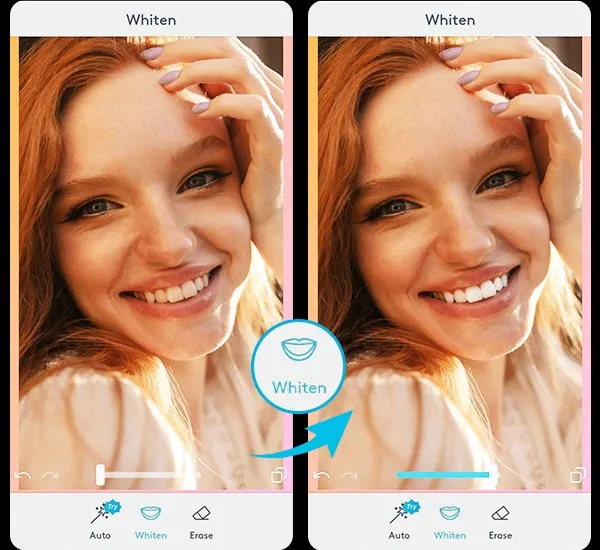
What are Teeth Whitening Apps
Teeth whitening apps are photo editing applications designed to digitally enhance the appearance of teeth in pictures. These apps offer a range of tools that allow users to brighten, whiten, and perfect their smiles within seconds. Available on both iOS and Android platforms, these apps have gained popularity among social media users, selfie enthusiasts, and anyone looking to enhance their photos quickly and easily. By using advanced algorithms and editing capabilities, these apps allow users to achieve a brighter and more aesthetically pleasing smile without the need for professional dental work or expensive treatments. They are a convenient and accessible way to improve your photos, ensuring your smile always looks its best. These apps provide an easy way to adjust the color, brightness, and shade of the teeth, remove blemishes, and generally improve the overall look of a person’s smile in a digital image. They have become an essential tool for anyone looking to perfect their selfies and other photos.
Top 5 Teeth Whitening Apps for Pictures
The market is filled with numerous photo editing apps, but only a select few truly excel when it comes to teeth whitening. Here’s a curated list of the top 5 apps known for their exceptional teeth whitening capabilities, ease of use, and overall editing features. These apps are not only popular for their teeth whitening features but also provide a comprehensive suite of tools that cater to a wide array of photo editing needs. From basic adjustments to advanced enhancements, these applications provide everything you need to transform your pictures. These apps allow users to experiment with different levels of whitening, ensuring a natural look that complements the rest of the image. These apps stand out due to their user-friendly interfaces, powerful features, and positive user reviews, making them the go-to choices for anyone seeking a brighter, more confident smile in their pictures.
Facetune Features and How to Use
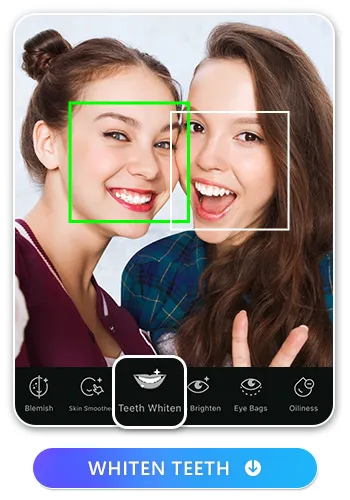
Facetune is a widely recognized photo editing app that offers various tools to enhance selfies and portraits, including a dedicated teeth whitening feature. The app’s interface is intuitive, making it easy for users of all skill levels to achieve professional-looking results. To whiten teeth in Facetune, users simply need to select the ‘Teeth’ tool. The app then allows you to adjust the intensity of the whitening effect with a slider, ensuring a natural and balanced look. The app’s smoothing feature can also be used to remove any blemishes or imperfections on the teeth, further enhancing the smile. Facetune also includes other features, like skin smoothing, reshaping, and makeup application, making it an all-in-one solution for photo enhancement. It is popular among those who prioritize a user-friendly experience and high-quality results, enabling users to perfect their photos quickly and efficiently.
How to Whiten Teeth
Whiten teeth using Facetune, start by selecting the ‘Teeth’ tool, usually represented by a tooth icon. Once selected, the app automatically detects the teeth in the photo, allowing you to apply the whitening effect. A slider typically controls the intensity of the whitening; gently increase the intensity until you achieve a natural, brighter shade. Avoid over-whitening to maintain realism and to prevent an artificial appearance. Once you are happy with the results, you can save the edited photo directly from the app. Additional features like smoothing and detail adjustments can further perfect your smile. Experiment with the settings to find what suits the image best, and don’t be afraid to undo and redo if necessary. Practice makes perfect when it comes to achieving natural-looking results with any photo editing app.
AirBrush and Its Whitening Tools
AirBrush is another popular app known for its user-friendly features and effective photo enhancements. It features dedicated tools to whiten teeth. The app is designed with ease of use in mind, making it accessible to both casual users and professional editors. To use AirBrush’s teeth whitening feature, select the ‘Teeth’ tool, and the app will automatically detect the teeth in your image. You can then use a slider to adjust the whitening effect, allowing you to control the brightness of your smile. AirBrush also provides other editing tools, such as blemish removal, skin smoothing, and reshaping capabilities, allowing you to enhance the overall look of your photos. These features make AirBrush an excellent choice for achieving natural-looking results in your images, with an emphasis on making the editing process straightforward and efficient.
Teeth Whitening Techniques

Most teeth whitening apps use similar techniques to enhance the appearance of teeth. These apps typically apply a brightening filter to the teeth, adjusting the color and saturation to make them appear whiter. The process often involves sophisticated algorithms that automatically detect the teeth in an image, simplifying the editing process for the user. Some apps allow for manual adjustments, letting users precisely target and modify specific areas of the teeth for a more customized effect. The best apps offer a balance between automated and manual controls, giving users flexibility in achieving the desired results. A key aspect of these techniques is to ensure a natural-looking outcome, preventing the teeth from appearing overly bright or artificial. Fine-tuning these settings is important for achieving a realistic and appealing smile.
YouCam Perfect’s Whitening Capabilities
YouCam Perfect is a versatile photo editing app that includes robust teeth whitening capabilities. This app combines an intuitive interface with powerful features, making it suitable for both beginners and experienced users. The teeth whitening tool in YouCam Perfect is designed to be easy to use, often featuring a single-tap adjustment that quickly brightens teeth. Users can fine-tune the results using sliders to control the intensity and saturation, ensuring a natural and balanced look. In addition to whitening, YouCam Perfect offers a range of other editing tools, such as skin smoothing, eye enhancement, and body reshaping features. It’s designed to provide a seamless editing experience, allowing users to effortlessly improve their photos. The app provides quick, easy ways to enhance your pictures, making it a favorite for those seeking to create polished images.
Step-by-Step Whitening
Start by opening your chosen photo in the app. Locate and select the ‘Teeth’ tool, typically found in the editing menu. The app automatically detects the teeth, but you might need to manually adjust the selection if necessary. Use the whitening slider to gradually increase the brightness of the teeth. Avoid over-whitening to prevent an unnatural appearance; a subtle adjustment is often the best approach. You can also use the smoothing tools to further enhance the appearance of the teeth. Save the edited photo once you are satisfied with the results. You can also experiment with different settings to refine your smile, ensuring it blends naturally with the rest of your image. Regularly practicing these steps will help you to consistently achieve professional-looking results in your photos, making your smile brighter and more appealing.
Snapseed and Its Versatile Editing Options

Snapseed is a powerful and versatile photo editing app developed by Google, offering a wide range of tools for both basic and advanced editing. While Snapseed does not have a dedicated ‘Teeth Whitening’ tool, it offers multiple features that can be used to achieve similar results. Users can use the ‘Selective’ tool to target the teeth specifically, adjusting brightness, contrast, and structure. This allows for a more customized approach, enabling precise control over the whitening process. The ‘Brush’ tool in Snapseed also allows for localized adjustments, which can be used to brighten and enhance the appearance of teeth. Snapseed’s flexibility makes it a great option for users who prefer a more hands-on editing experience. The app’s professional-grade tools allow for very precise edits, making Snapseed an excellent choice for users who want more control over the final look of their photos.
How to Apply Teeth Whitening
Start by selecting the photo you want to edit in your chosen app. Locate the teeth whitening tool and select it; the app should automatically identify the teeth. Use the slider to adjust the intensity of the whitening effect. Start with a small adjustment and gradually increase it until you achieve a natural, bright smile. If you find the effect too strong, reduce the intensity until it looks more realistic. Some apps provide options to fine-tune the results further. After perfecting your smile, you can also use additional features like smoothing and detail enhancements for an overall polished look. These simple steps are a quick and easy way to enhance your photos, ensuring your smile always looks its best. Practice makes perfect when it comes to achieving a natural and stunning smile enhancement.
VSCO and Its Color Correction Tools
VSCO is a popular photo editing app, famed for its filters and creative controls, providing a professional editing experience. VSCO excels at color correction, and its features can be cleverly used for subtle teeth whitening. Users can adjust the ‘Exposure’ and ‘Contrast’ settings to subtly brighten the teeth, avoiding an over-whitened look. VSCO’s color adjustment tools provide flexibility for enhancing the smile while preserving a natural appearance. VSCO is known for its subtle adjustments and elegant filters, creating an excellent platform for enhancing the overall color balance of the image. The app’s features help you subtly enhance your smile by improving the overall aesthetics of the photos, making it a great option for those seeking natural-looking results.
Improving Smile’s Brightness

To improve the brightness of your smile, start by selecting a photo in a teeth whitening app. Locate the teeth whitening feature and choose it. Then use the slider to adjust the intensity of the whitening. Start by making small adjustments to ensure the results look natural. You can also experiment with other tools to fine-tune the overall look. Consider adjusting the exposure and contrast to enhance the brightness and definition of your teeth. By focusing on subtle adjustments, you can achieve a brighter smile that complements the rest of the image. Regularly practicing these steps will help you achieve a brighter smile. Experiment with the different settings to see what suits the image best, and do not be afraid to undo and redo the changes.
Additional Tips for a Perfect Smile
To achieve the perfect smile in your photos, several additional tips can enhance your results. Ensure that the lighting in your photo is optimal; natural light is generally preferred. Avoid harsh shadows that can make your teeth look darker. Use filters to subtly enhance the overall look of your photo. Consider using the smoothing tool on your skin to enhance the overall look of your image. Pay attention to the angle of your shot. A slightly angled view can often be more flattering. Take multiple shots and choose the best one. Experiment with different levels of whitening to find the perfect balance. Remember to check for realism, ensuring your teeth look natural and complement the rest of your image. Follow these tips to take your photos to the next level and make sure your smile always shines brightly.
Maintain and Enhance Whitened Teeth
Once you’ve whitened your teeth in photos, there are steps you can take to maintain the appearance. In real life, regular dental check-ups and professional cleanings can help maintain a bright smile. Use teeth whitening toothpaste and consider whitening strips or gels for at-home maintenance. Avoid or limit consumption of foods and drinks that can stain your teeth, such as coffee, tea, and red wine. When taking photos, be mindful of lighting. Natural and bright light is best for showcasing your smile. For the best results, combine real-life dental care with your photo editing routine. This ensures that your smile not only looks great in photos but also reflects healthy dental habits. Consistent care and maintenance will help you to keep your teeth looking their best both in pictures and in person.